



Description
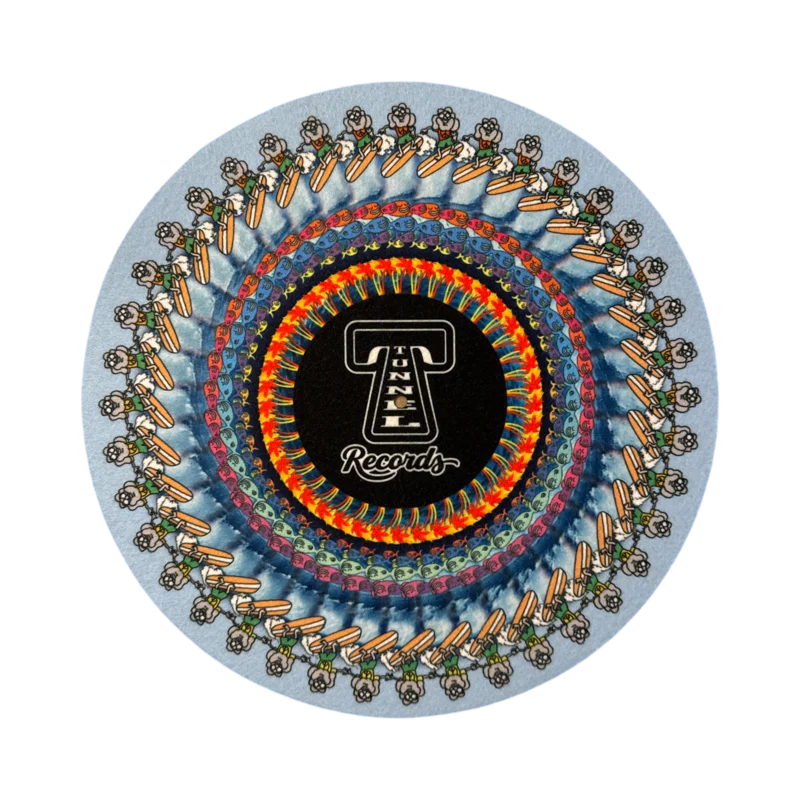
I’ve always wanted a wacky, fun slipmat and have been admiring the work of Drew Tetz from a distance for some time. He makes amazing animated creations that come to life under the right light and speed conditions. I gave Drew a few guidelines and let him get creative, and after a few iterations ‘Surfing Jer’ slipmat was born!
Use your imagination for what is happening here, but if the shop was an island surrounding by solid waves with an underwater aquatic city below, only Jerry would show. Or something like that.
The reverse is the classic Tunnel Logo designed by my man Benny Gold if wacky isn’t your thing.
Spin these at 45 under bright light, grab your phone and enjoy!
To view with a camera
To view the effect through a camera phone, place the disc on the turntable at the proper speed under a bright light. The shutter will blend the frames together to form a cohesive image on the screen.
(The brighter the light, the clearer the image will appear, sotry to use as many light sources as possiblefor the best results!)
To view with astrobe light app
You can also view the effect with the naked eye through the use of a strobe light or strobe light app set to 30Hz. (It’s important to be 30Hz to mimic the 30FPS shutter.)Strobe Light Tachometeris one of my favorite strobe apps on the iPhone, but any app which can be set to 30Hz should work.
Point the flash at your spinning turntable to see the moving picture. A darker room can provide higher contrast, so try turning out the lights for a clearer image.
Tips & troubleshooting
- Themost important part of getting a clear image isbright, direct light.Even turning on your phone flash or bringing over an extra lamp can greatly improve your results, so try to use as many lights as possible!
- If you don’t have extra lights, you canget a little extra sharpness by lowering the exposure/brightnessof the camera.(To do this on an iPhone, tap an area of the screen to focus on. A square should appear around the focal point with a sun icon beside it. Drag the sun down the slider to lower the exposure.)
- You can also decrease blurriness by setting the focus of the camera before pressing play. Using a tripod (or something to rest your phone on) makes this much easier.
- If the shapes appear to be moving too quickly, your turntable may be set to the wrong speed. See if it looks better when you switch to 33 or 45RPM.
- You will most likely get the best results with your phone about a foot away from the animation. Try moving the phone a few inches closer or further to tune in the best view for you.
Here are a few extra tutorials for specific records:
Reviews
There are no reviews yet.